Now there are multiple reasons for subscribing to our blog.
(Note:For those who don’t know what is RSS and email subscription is, please watch the video number 9 and 10 below.)
1.You get all the latest updates on Technotip.org for FREE.
We work hard to bring good information’s to the door steps of all our readers. And we too hate spam, as much as you hate them.
There will be lot of promo-codes, free stuffs, tips, tutorial, tricks, hacks, give aways etc coming soon on Technotip.org , so signing up for the news letter will surly help.
2. You get Yaro’s all the 10 videos download link for FREE.
Yaro makes over $20,000 monthly with his blogs and courses, so he knows what he is talking about.
Yaro Starak is getting ready to open the Blog Mastermind course, and by doing so he just launched a site with several how-to videos, that must be watched, if you are a beginner in blogosphere.
You can watch all those 10 videos below this article too.
You need not signup for anything for watching these FREE videos.
But, if you want to download these videos to your computer and want to watch it again and again in your spare time, then you need to subscribe to our FREE RSS or/and EMAIL news letters.
So here are the 10 videos…..Don’t miss watching them, particularly, if you are a beginner in blogging and want to know more.
1. Video 1 – Why You Should Use WordPress
2. Video 2 – How To Get Your Own Domain Name
3. Video 3 – How To Get A Web Host
4. Video 4 – How To Install WordPress With One Click
5. Video 5 – How To Upload Files To Your Web Host Using FTP
6. Video 6 – Choosing A WordPress Theme For Your New Blog
7. Video 7 – How To Install And Use WordPress Plugins
8. Video 8 – How To Create Your First Blog Post And Blog Page
9. Video 9 – What RSS Is And Why You Need It
10. Video 10 – How To Use Feedburner
To download all these above( 10 videos ) videos to your computer just subscribe to our FREE RSS or/and EMAIL news letters.
These video download links have been distributed to all our Subscribers after getting the permission from Yaro. So feel free to provoid our blog link, if asked in Yaro’s blog.
Please inform us, if there is any video not working here.
Hope you enjoy it.
Orkut shows AdSense Ads in certain selective pages. Actually, its in very rare cases, we can see Ads in Orkut.
And all these days we had seen only text ads that were blent so nicely to the Orkut theme. And all the ads open in new window when some one clicks on it.
Today morning, as I was checking my Orkut account, I spotted an image ad in my Orkut homepage.
And we are also ready with some more screen shots of AdSense Ads shown on our blog, with many different fonts. So please stay tuned, we shall be publishing it shortly.
These tips may seem to be silly to many geeks, but most of the geeks also neglect these small things and frustrate later, due to degraded performance of their computer.
All these tips are applicable for the computers with 1GB or less RAM and running with single processors.
But it may help computers with any configurations over time, when there is lot of things loaded in your hard disk and RAM.
1. Don’t install unnecessary driver software….this will increase the boot time.
Ex:- Installing printer drive software, when there is no printer with you.
3. Remove unwanted software from loading as soon as your computer is started.
For windows users, goto Run -> type “msconfig“-> goto Startup tab -> there properly read the Command lists and uncheck the unnecessary applications running.
4. Select the best and install only required software.
Ex:- Do not use 15 to 20 music player software. Just use 2 or 3 good featured software.
5. Use good anti-virus, which does not slow down your PC speed. We highly recommend using Avast, its free non-commercial Home us and costs some money for commercial use.
6. Do not install the software that comes in internet as a popup. These software will usually slowdown your PC and its effect can’t be removed unless formatting your PC, if its a malware or spyware. As we can never guess exactly, what that software has done to your PC.
7. Do not leave your pen drive, card reader etc in the PC after you have finished using it.
Do not leave any CD or DVD in the drive after the use.
8. If you have put any animated background image to your desktop background, then remove it first. This will be loaded into the memory and will surly contribute for performance degrading of your system.
9. If you are a programmer, don’t forget to close the editors like C/C++, JCreator etc editors before using some other applications. This will slowdown the PC and in some cases, the system any hang.
10. Restart and shutdown your computers at least once in a day. This tip might be surprising for some of you. But remember, many geeks use the option called Hibernate instead of shutdown, so that, they can resume their work from the point where they had left.
This is a great feature, but restarting or shutting down the PC at least once in a day may help in maintaining the health of your Personal Computers.
These are some of the 10 simple tips for optimizing your computers.
But this is not the end. Now I would like to leave it to you. Please share your knowledge in the comment section and let all of us know your tip for optimizing Personal computers. And the list will grow as and when we get some interesting tip by anyone of you.
Yesterday I had written about a small feature available in AdSense Ads, that is, having a Google Checkout symbol in the Ad. And today as I published “Google Guide for Bloggers” article, I could see some widgets like ads in my AdSense Ad units. And when I placed my mouse pointer over the link of the Ad, I got the following URL in my status bar..
When we take our mouse over the arrow mark, a message “Next item” comes. This can be seen in below screen shots.
Above are the screen shots showing all the 6 Ads present in that single Ad Unit.
Loading time of this page is more, as I have put .png files without optimizing it. I wanted to keep up the quality of those image.
These ads are similar to those of ebay ads. But the scrolling of ads brings more interactiveness for the Advertisements. And these ads look more clean and interesting and more importantly, they load faster, unlike ebay, widgetbucks, amazon etc ads.
I had heard of Google testing this Ad format, but had not seen it live before. It was nice to see this kind of new ad format on my own blog today. Anyway, I wish Best-of-luck to Google, with its testing.
Each and every blogger on this earth should watch this video fully, to learn some of the best practices, which Google itself follows.
This is a video recording of Marissa Mayer’s keynote that she recently delivered at the Google I/O Developers Conference. You’ll learn some very interesting facts about Google in this video. But more importantly, you should observe and relate or compare every aspects followed by Google to that followed by you, on your blog.
This would give you some idea of where you are doing wrong and what you should do, so that, to be on right track.
Here are some of the points you should observe and learn from this video…. 1. Google has employed designers, fashion designers, cartoonists, choreographers, developers etc mainly for its iGoogle project. So that, each and every aspect of their website is professional looking. So we should also give importance to every aspect of our blog, starting from the logo, design, content, layout, advertisements etc. It should be handled professionally.
2. Watch the video at 4min 55 sec, here Mayer is talking about the simple design of Google homepage. We should also make our website/blog as simple as possible, Without including more images, flash, etc, which increases the load time of our blog.
3. Get some friends and tell them to use your blog. Get some unbiased feedback. Take all the feed backs positively. Actually, negative feed back will help us a lot to improve our blog.
4. You have to know about how the data transfer takes place when a user visits your blog.
When a visitor visits your blog, all the http request is sent from the users computer to all the http objects present on your blog page. So if you have many objects displayed on your blog from different servers, then the load time would definitely be higher.
Its ideal to place all the objects like images, scripts etc inside one server and then link them on to your blog.
Also the speed of the server(where you have hosted your blog) is also important. And if you have frequent downtime means, you should think of changing your host. Technotip.org recommends Doreo host.
5.A/B split testing. Use some testing methods to determine the logo positioning, advertisement positioning etc.
6. Positioning of each thing on your blog will contribute to your success or failure. So be careful in A/B split testing.
7. “If you don’t listen to your customers, someone else will”. — Sam Walton.
8. “If I had asked people, what they wanted. They would have said, faster horses”. — Henry Ford.
9. Number of items displayed on your blog also play a vital role.
It is recommended that, you should remove all those widgets, badges, social networking link logos etc from your side bar, as it increase the load time and contributes for the bad user experience.
Social networking link logos can be displayed in your about me page or contact page.
10. Faster loading websites get more returning visitors over time.
11. Allow the comments to show on your blog, by making comment moderation quicker. And it will be good to see their comments live as soon as possible. And also reply for the comments quickly and aptly and promptly. This will show your commentators(who are the actual contributes of your blog) that, you value their voice(opinion).
12. Always welcome feedback.
13. Be upto date and blog according to the current trends of your niche.
14. Once you have implemented everything in your blog(after A/B slip testing), just don’t think its the perfect one. You need to run A/B slit testing again after a year or two. Because, the user requirements change along with time and you need to be quick to act accordingly.
16. Have “Healthy disrespect for the impossible”. — Larry page.
17. Nothing can be a perfect solution. We have to work constantly and keep moving nearer and nearer to perfection.
18. Imagination is muscle…We need to assume ourselves for What problems to work on, what products to develop etc.
19. Respond faster, for all those who report any bug on your blog.
If you can’t resolve the problem, just inform them that, you are working on it currently.
In some cases, the reporter of the bug himself/herself may even give the solution to the problem.
20. Watch from 45th min of the video to see a small Summary of this video.
Watch from 46th min for the question and answer session with Marissa Mayer.
These are some of the things that I could make out while watching this video. But this is not the end. Each person has his own ability to watch and understand. You may even get some more ideas after watching this video. If this is a case with you, then please share your thoughts in the below comment section..
Google AdSense is improving all the time. And you might have observed some of the improvements recently. Today I just wanted to show some screen shots of the ads which shows that, the advertisers website has the option of payment as Google Checkout, even before we click on the Advertisement. Below are the self explanatory screen shots…
Observe the symbol inside the circled area. This actually indicated that, the the site accepts Google Checkout. This helps the user to know the option of payment before he clicks on the link(Advertisement).
Google Checkout is a Google service used to buy and sell things. It is a secure place for all type of transactions. We can connect our Credit card to our Google Checkout account and carry on the business transaction more securely.
Now, when we rollover our mouse pointer over the circled area, we get the following message “This site accepts Google Checkout”. Below is a screen shot…
You may say, this as a small feature. But I think all such small features will really help Google to get more Advertisers.
We have been using avast! in our home computer from 2 years and its a tension free computing now, as our computer has never been infected by any virus, spyware or malware from 2 years.
Before installing avast, I use to format my Computer almost 3 to 5 times in 6 months, due to some external attacks. But after installing avast, I have not at all thought about formatting my PC. Its a kind of – “Simply install and forget”.
The impressive part is, avast Home edition is free to use for non-commercial, home purpose.
And avast! is offered in over 30 language versions, and you need to select the language you require before you download.
You can register avast! online, and you will get a unique, free registration key and it will only work for your computer. So, your registration key would be of no use for some one else.
After you use the FREE version of avast! for one year, all the updates will get expired and you must again register for new registration key online and you will start getting updates again till 1 year. Like this, you need to register every year.
And note that, you just have to install it, get the registration code and leave it, the updates are totally automatic(internet connection required! ).
The free version supports:-
Windows 95
Windows 98
Windows Me
Windows NT 4 (No Server)
Windows 2000 (No Server)
Windows XP (No Server)
Windows Vista
It is sad to see only the Windows OS support here.
I have used many anti-virus programs available in the internet, and had one or the other problems…like the increase in loading time, popups, update notification etc. And the software did not work to the mark.
And in my journey of trying anti-virus programs, I got avast! , used it for almost more than 2 years now, and I am a satisfied user. And I will surly buy the paid version of avast! in the future, for commercial use.
Now I am using avast in my home computer(used for entertainment, surfing and for testing some software etc — Totally non-commercial). And on my laptop(which is used for blogging), vista firewall does all the job.
So, if you are looking for a FREE version anti-virus, with professional performance and simple to use interface, then avast! could be for you. And remember, use it on non-commercial,home computers only.
Tried and Trusted With over 50 million users of avast!, you can rest assured that you are using one of the most tried and trusted products in Windows security.
If you want more security, more protection and still more features, for your office or for any commercial purpose, then there is paid avast! version for it. And it would be smart to investment on buying avast! products.
Which anti-virus do you use to protect your computer ? And what do your feel about its performance, please share with us, in the comment section.
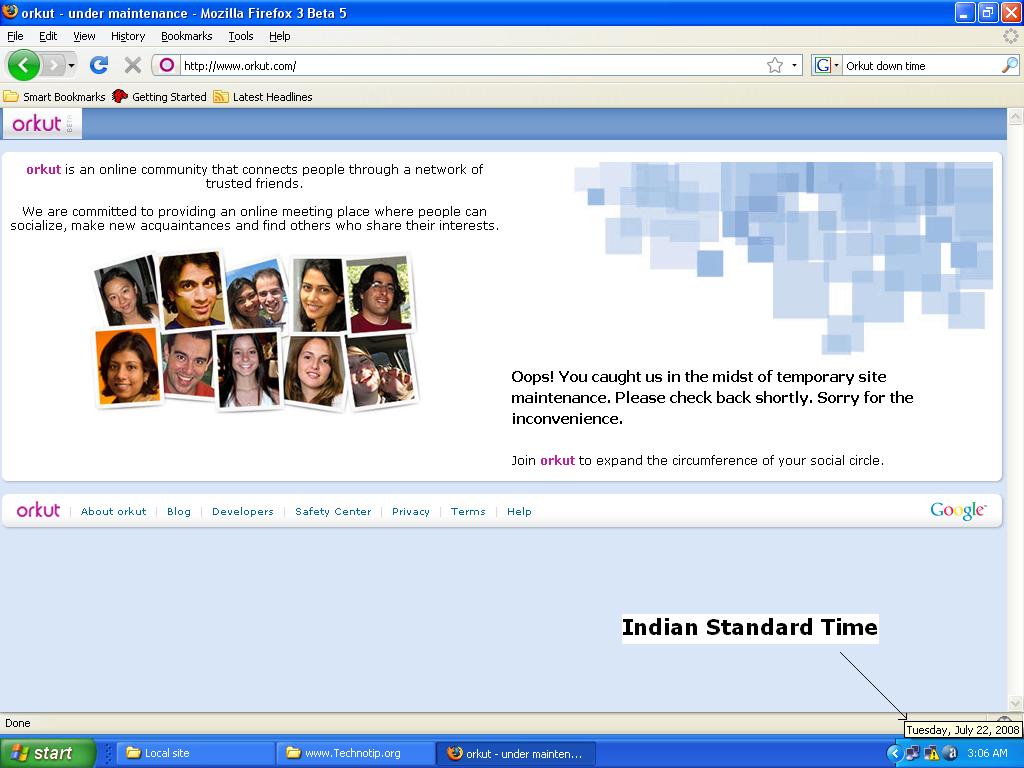
As we all know, Orkut is one of the most widely used social networking site in Brazil and India. Well its a bad news for all those Orkut addicts, that Orkut is again down. And the message displayed says that, it is under maintenance.
Here is the Screen Shot…Click here to see below image in original size.
I was online just prior to the downtime – the friends list went down first and then there were plenty of their donut error messages and finally the above page came to rescue me from further wasting my time.
One thing I am not sure about is, Why Google doesn’t inform the users before the maintenance time.And there is no information available in the Official Orkut Blog either.
Anyway, lets wish Orkut to successfully remove all the bugs in it.
Update: Orkut is back to its normal state, without much delay.
 Yaro Starak is getting ready to open the Blog Mastermind course, and by doing so he just launched a site with several how-to videos, that must be watched, if you are a beginner in blogosphere.










 part is, avast Home edition is free to use for non-commercial, home purpose.
 I have used many anti-virus programs available in the internet, and had one or the other problems…like the increase in loading time, popups, update notification etc. And the software did not work to the mark.