Traffic Strategies PART 3: Submit your blog to these websites

Today’s article is full of information’s that we have experienced with our blog.

1) BurstBlog of Pluck is an opt-in aggregation and syndication service that brings high-quality, topical blogs together with high-traffic web sites. With BlogBurst, bloggers gain visibility, audience reach and traffic through placement on major online publishers and media destinations in real time.

* BlogBurst will promote your blog in their publisher workbench
* BlogBurst top-tier publishers display your blog content on their sites
* Clicks on your byline drive new traffic to your blog

Most famous publishers of BlogBurst, who publish the BlogBurst content are:-


More publisher blogs will be added in coming days(as blogburst promises). Technotip.org was also featured on some of these great websites, here are some of the links from which we got lot of traffic Know This Before Using Google Custom Search Engine, How to get Good Night Sleep?. After reading this, the first question you may ask is, isn’t that publishing duplicate content(against Google) ? At first sight, it seems to be yes. But in reality, see the number of followers of those famous websites. They are already famous companies and many people follow them religiously. Being featured on such websites will bring in greater exposure of our blog and more traffic and reputation. Just request for an invitation here.

Technical Criteria

At this time BlogBurst requires that you provide a syndication feed in a standard XML format (RSS, Atom, etc). Most popular blogging platforms (TypePad, Blogger, Easyjournal, MovableType, WordPress, LiveJournal etc.) and FeedBurner provide compatible feeds that will work seamlessly with the system. Feeds should be full text posts and should not contain advertising, sponsorships or other commercial information.

And if you have Adsense for Feed activated on your feed, then just don’t worry. Consider setting up a second feed on Feedburner with full feed of your blog, but do not advertise that feed on your blog site. Then submit that feed to BlogBurst. Note that Blogburst do not publish the URL for the feed you submit to them. Once you are accepted into BlogBurst, you will get an account where you can see who has published your contents and how much traffic you are getting from them etc. And the best thing about BlogBurst network is:- You need not be a "A" list blogger to get your contents featured. You just need to publish good content, as you do and if your content is good then your article will be featured. Our blog is a very new blog and still it has got featured. This shows the real value of BlogBurst network. We think that, its a great honor to get invited to join BlogBurst, and we are really thankful to blogburst for inviting us.

2) CSS gallery to get traffic:- If you have a good looking blog template or theme, then go ahead and submit your blog to these websites and you can get lot of steady traffic to your site. Our site has been accepted into this and we are getting traffic to our site consistently. And in some of the sites they have voting system and if your blog gets more votes, then your blog will be in the featured category and will get still more traffic.

3) killerstartups:- killerstartups is another place to get traffic from.They have about 11,700 RSS readers and about 513,000 visitors/month (according to Compete.com, which tracks only US based visitors). Killerstartups is ranked among the top 3,300 USA websites, according to Alexa, so it is a great place to introduce your company to the world. But the problem is how to get your site on there. They have an online form where you can fill in all the required details, but then you can only hope for the best. We found Killerstartups from an interesting article at QOT. We did not face any problem to get accepted by them, but it was after getting accepted the real competition started. Killerstartups have a "Top 10" section. After being listed there we start getting lot of traffic and they also make the link to our blog follow from their usual nofollow. And many people start linking to our blog, once our blog reaches and does well(with voting) in the top 10 section. "Vote us, if you think our blog is worth it".

4) 9Rules : And not to forget about 9Rules, even though there are lot of rules to follow to get accepted and to be their member. 9Rules do not accept blogs at any time, they have their schedule to accept the sites and their 7th round has been finished some times ago.

If you find some other websites that can bring lot of traffic, then please tell us in the comment section.
Get 45 days of free hosting from Doreo host

If you are new or want to change your present hosting company, then why not try Doreo host.

Here is a promo code or offer or coupon code or Discount coupon ( “technotip.org” without cotes ) which will give you 45 days of FREE hosting or 12$ off of your purchase of any hosting plans from Doreo.

If you want to know more details –> why we recommend Doreo host.

Your blogger blog template search ends here!

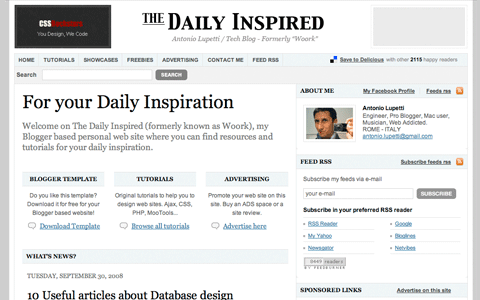
Antonio Lupetti an Engineer, Pro Blogger, Mac user, Musician, Web Addicted from ROME – ITALY has released a wonderful blogger template. Actually he is a master of that template, as he himself use the template on his blog. That means, he has tested it, used it so long that he has almost cleared all the bugs in it.

I had always loved his blog template and hesitated to ask for the source code(to modify, without violating the copy rights). But to my surprise and Antonio Lupetti’s goodness, he has finally released his template source code to the public.

woork-blogspot-template-released-to-public

He has actually released the HTML version rather than XML source code, because HTML is more common than XML and we can easily modify the HTML codes using many software.
Just copy and paste the HTML codes and it will work. Many people think that, they must use only XML in blogger templates, but that’s not true, you can also use valid HTML codes.

The template looks so professional. The template supports easy integration of third-party advertisements (both AdSense or any other ad network and custom 125×125 banners), the best part for people trying to make more money is — you can integrate ads within post(look at the individual post page),Twitter, Job board, Flickr pictures, delicious bookmarks, and you may also embed RSS feeds via the FeedBurner service. And more importantly, I love the comment section of the template. It looks great. But the fact that, blogger platform doesn’t allow for user friendly commenting, we need to migrate to some other page to comment. Hope its done for spam controlling purpose!

And I think this theme works with old Blogspot users also, who haven’t migrated from the Classic HTML template yet, because this is a HTML source code, and theoretically it must work. I haven’t tried it practically, and I am waiting for someone to clear this doubt.

I was very excited to write a post about customizing the template, but Antonio Lupetti himself has done the job and he has explained the customization part of the template from Top to Bottom. Its great article and a must read if you are a blogspot user.
He explains- Adding Blog Logo, Adding tab on the navigation bar, Search field, Customizing Home Page, Your name below each post title, Adding sections on the sidebar, About me section, Recent Post*, Categories on the sidebar, etc. If you have any problem with the template, you can always contact Antonio Lupetti or do a Google Search(if its a general blogger problem).
Happy Blogging 🙂

Add Refinements/Labels to your Custom Search Engine

custom_search_sm

Log into CSE and click on Control panel –> Refinements –> Add refinement.

Refinements are labels that you apply to websites. They appear as a list of links above search results, offering users a way to narrow their search. When a user clicks a refinement label, the sites that you have labeled are given priority in the results. In addition to labeling sites, you can also specify additional words that are added to users’ queries when they click a label, providing even more targeted results.
custom_search_sm
Google maintains a list of existing refinement labels. If you create a label with the same name as one of these, or with the same name as a label in another search engine that you or someone who is collaborating with you has created, users will also have the benefit of seeing relevant sites from these sources in their search results also.

Here refinements acts like the key word help for finding the relevant articles in our blog.

Add Custom Search Engine to your wordpress blog easily

Replace your default wordpress theme search engine with Google Custom Search Engine.
There are 3 option’s to show the result page:-

    Open results on Google in the same window.
    Open results on Google in a new window.
    Open results within my own site.

Google-SERP-option
If you want to have results within your own site, then you need to create another page similar to your blog pages(to make it look more professional), and add the codes from Adsense account. This requires one to have some knowledge about html and some other basic Internet programming knowledge.
If you are using a magazine style theme and if you are showing additional advertisements on the sidebar, then remove it from your result page. Because its an violation of adsense policy.

There is another easy option, which doesn’t require any programming knowledge.
1. Open results on Google in the same window.
2. Open results on Google in a new window.

Now you decide about opening results page in new window or in the same window(Its considered user friendly, if all links open in same window, so we recommend selecting the 1st option. i.e., Open Results in the same window.)

Goto your Adsense account or Google Custom Search Engine page and get the codes to paste in your wordpress blog.

Now login to your wordpress and click on the “Design” tab –> Click on “Theme Editor”. Now search for “searchform.php” or similar file and click on it.
Now look for

tags and delete everything inbetween them and paste the CSE codes from your adsense or Google CSE account and save it.
Google-Custom-Search-Engine-results
For Example:- Look at my Custom Search Engine[Top right corner — near navigation bar] and search for any keyword and see the result page.

If you are good at HTML and PHP, you can integrate the CSE into your own site and you can make the results to be shown in your own site. This looks even more professional.
But having any type of Custom Search Engine is better than not having one, so follow any method and integrate CSE to your blog.

Know This Before Using Google Custom Search Engine

There are many advantages of adding Google Custom Search Engine to your wordpress blog.
Some are listed below..
1. People are used to search in Google.com and they will not find it difficult to do the same in your blog.
2. You can monetize the search results using Google Ads. [Optional]
3. Ability to give options for users, to search only our blog or the entire web.
4. We can know exactly what people are searching in our blog using the search engine.
5. Looks more professional. SERP can be hosted on our own site or Google.
6. Easy to integrate and use.
7. More features. We can include Refinements/Labels at the top of the result page.
8. Highly Customizable. We can customize the look and feel of the result page. We can put our logo instead of Google logo and link it back to our main site/blog. Font colour and the placement of ads can be controlled by ourselves.
9. We can control the type of ads appearing on our search result page, by including Search engine keywords, Site description etc. The ads will match to the keyword of search as well as to the keywords that we have included. We can even block competitors advertisements.
10. Can include the results from multiple sites/blogs.

Caution:-
We have seen many bloggers using CSE(Custom Search Engine) and their SERP(Search Engine Result Page) is violating the Adsense policy, by showing additional ads on the SERP.
Here is what Google has to say about it..

Can I show ads on AdSense for search results pages in my own site?

We ask that you don’t place any additional ads on pages with framed search results. However, you’re welcome to place an AdSense for search box on the page so your users can continue to search if they haven’t found what they’re looking for.

Google-Custom-Search-Engine-results

Now without wasting much of time, Create a CSE and put it on to your blog, if you haven’t done yet.
There are two ways to do this.
1. Login to your adsense account and goto “AdSense Setup” tab and click on “AdSense for Search”. Further instruction are self explanatory.
2. Goto Google Custom Search Engine and click on “Create a Custom Search Engine”.

The advantage of using the 2nd option is, we get “Advance setup features” and more customization options. So we recommend using CSE.

To connect your Custom Search Engine account with Google AdSense, visit the Make money tab in your search engine’s control panel.

Fill in the form with the email address that you use with your AdSense account, your zip code, and the last 5 digits of your phone number. Google will use this information to connect your Custom Search Engine account to your AdSense account and you can start making money immediately.

Now you make money by monetizing the search result page and your readers will be comfortable searching what they are looking for. So its a win-win situation 🙂

Feeling Good Can Enhance Your Performance

Like many of you, I am also very much interested in blogging and I feel good while I am blogging or working for my blog. It gives me a kind of joy, even when I am working overtime or late nights.
All these years while I was undergraduate, I use to feel too bad while I had to write assignments(Homework’s). I use to hurryup and finish the works off, so that I can be free afterwards. But those things never helped me, as I never really understood what I was writing.

Day before yesterday as I was writing one of my first assignments in PG(Post Graduation — MCA[Master of Computer Application]), I just wanted to finish it off, and start blogging. But mean while I thought, let me try to enjoy writing the assignment and try to feel good, like I do when I am blogging. Guess what, I really started getting interest in my assignment writing work!
I just practiced this feeling good exercise for two days and now I am completely loving my assignments and trying to understand and write – Now its no more a burden.

Some times when I never got any idea for blogging, I use to feel bad and frustrated and at that time I was never able to comeup with any new article ideas. It was only after a deep relaxing sleep or some jolly long walks, I use to get some ideas for blogging. But when I started to fall in love with blogging completely and started feeling good, ideas for blogging started coming easily and now I don’t get frustrated even when there is no idea to write any thing, I just feel good and after a while some idea pops up in my mind.
blogging-late-night
To start feeling good in the beginning will be a bit of forceful thing – you need to remember some thing which makes you feel good, like remember the flower that you love, garden, your pet animal, baby etc. Practice this for some time and you will start feeling good automatically while doing any work, and this will surly enhance your performance in any of the fields.

And one more thing is, we need to stop underestimating ourselves. Underestimating ourselves will surly be a great hindrance in our progress.

Brian Gardner’s Revolution theme(s) going open source

Brian Gardner has surprisingly decided to make his Revolution theme open source. This means that all themes will be released under the GPL license and in compliance with standards set forth by WordPress.
The themes that are currently available at Revolution theme site will no longer be available after 12:00 midnight, Friday October 31st.

Brian’s blog also reveals that – On November 1st 2008, a completely new Revolution site will launch. There will be a new set of themes on that website, which will be made available under the GPL license.

This image below, is now like a antique piece in museum:-
Brian-Gardner-Revolution-theme-site-30-oct-2008

Jason Schuller, who runs WP Elements as well as created the Featured Content Gallery plugin, will be teaming up with Brian Gardner on the upcoming Revolution project

Now, I know that many of you are thinking that – Oh man this is unfair to those who have already purchased Revolution theme. but look at what Brian Gardner has to say about it..

For the current All-Inclusive members…
I wanted to add that anyone who has purchased or upgraded to the current Revolution All-Inclusive membership, you will automatically inherit the ability to receive the aforementioned theme package benefits at no additional cost. This is our way of saying thanks for what you’ve spent already.

All these above information are actually taken directly from Brian Gardner’s blog post, head to his article to know more.

I am excited about Brian Gardner’s future projects and I wish him a great success in all his good work.